English Lesson Review Tools: Compare Four Approaches
Published: ·Updated: ·19 min read
 Sho
ShoThe lesson ends, you close the window — what do you do next? What happens in those minutes decides whether the lesson stays with you. This article covers the three things to do right afterwards, and how to choose the tool that keeps you doing them.
Here is the conclusion first. There are only three things to do, and you can decide on tools later. In fact, start with whatever you already use. Learning a new tool and keeping up a review habit are two different projects.
This article does not cover preparation before the lesson. How far to prepare is a separate decision, and mixing the two leaves both half-done. What follows is only about the gap between one lesson and the next. A rule of thumb for preparation is in the note-taking article.
Key takeaways
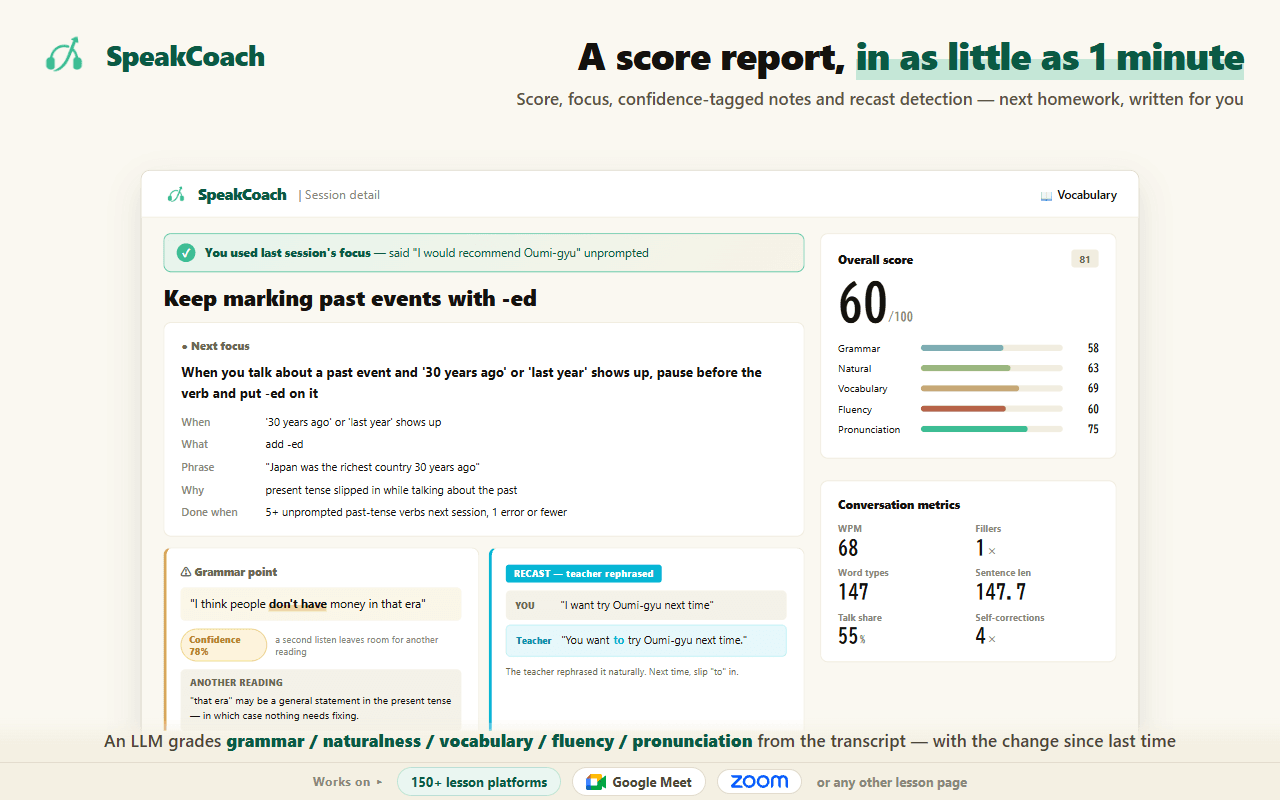
One of the tools below is ours; what it does, what it costs and how it handles your audio are written up separately.
- Three things right after the lesson: write down the one thing you could not say, get one correct way to say it, and decide when you will look at it again.
- Tools split into four jobs: capture, fix, store, recall. No single tool does all four.
- Free AI assistants do not carry over what happened last time. Both ChatGPT and Claude keep the feature for holding context together on the paid tier. Plan on pasting your request again every time.
- Letting a tool decide when you review is what makes it last. Relying on yourself to remember always breaks in a busy week.
- Starting with paper and a phone note is fine. Adding a tool once you actually feel that you cannot find things works better than setting one up on day one.
- Having a record and being able to recall are not the same thing. Re-reading a transcript is the weakest form of review there is.
What to do right after the lesson
Right after a lesson ends, you still remember what you could not say. That memory disappears surprisingly fast. Before you close the window, do these three things in this order.
First. Write one sentence, in your own language, about what you wanted to say and could not. Do not try to put it into English. "I wanted to say that it depends on your taste" is enough. If you try to produce English here, you switch from remembering to composing, and the time drains away.
If the service you use keeps a recording or a transcript, the order changes. The first step — remembering and writing — disappears entirely. But staring at the full transcript of a whole lesson only gets you the re-reading described in the next section. Decide how you hand it over.
When the lesson ends, copy the whole transcript, paste the request below first, and paste the transcript underneath it. That is all.
This is a transcript of an online English lesson. I am the student. Pull out three things from it. (1) Places where I wanted to say something and stalled or restarted. (2) Places where my English was unnatural, including anything the teacher rephrased for me. (3) Expressions the teacher used that I am not using. For each one, put my original line next to one natural way to say it. No explanations. Five items at most.
The last two sentences are what make this work. Without "no explanations" you get long commentary back, and reading it becomes the whole activity. Without "five items at most" a single lesson produces twenty items and the volume defeats you. This is not for reading — it is for picking the one to three items you will actually use next.
"I am the student" matters too. A transcript contains the teacher’s lines as well, and without that sentence you get the teacher’s English corrected. If your transcript already labels the speakers, you can paste it as is.
This shape works because of item three. You can remember what you failed to say, but expressions the teacher used never reached your attention, so they cannot come back from memory. If only what is noticed in the input gets taken in, then this is the part you can only recover from a record.
Second. Get one English way to say that sentence. If the teacher typed something in the chat, use that. If not, ask one of the tools described below. What matters here is not collecting several options. Pick one.
Third. Decide when you will look at it again. Just decide — you do not need to review it now. Tomorrow, three days later, and a week later is a reasonable set. Get through those three and the expression shows up in your next lesson.
Run through it once and it looks like this. In the lesson you wanted to say that whether people like that dish depends on their taste, and it would not come out. First you write, in your own language, that you could not say "it depends on taste". Then you get one English version — say, It depends on your taste. Finally you write tomorrow, three days from now, and next week beside it. That is three lines.
Try to come up with the English first and those three lines take ten minutes. Write in your own language and then get one English version, and it takes three. Changing nothing but the order changes the effort.
Some days you have no time. On those days, do only the first step. Write one sentence in your own language about what you could not say. That alone takes thirty seconds. You can still get the English tomorrow, but tomorrow you will not remember what it was you could not say. Secure the thing that disappears first.
Where you write it does not matter. A paper notebook, a note on your phone, a text file open beside the lesson window. There is one test: can you open it within three seconds of the lesson ending? Put it somewhere that takes effort to open and you will skip it on tired days. What to actually write in the notes is covered in a separate article.
Some days you cannot remember what you failed to say. When that happens, write down one topic you talked about instead. "Talked about weekend plans" is fine. As long as the topic is there, the next time it comes up you will notice that this is where you got stuck last time. That gets you far more than closing the window with nothing.
One thing to avoid: taking notes during the lesson. While you are writing you are not speaking, and your speaking time drops by exactly that much. If something comes up that you want to keep, ask the teacher to type it in the chat.
Why re-reading is the weakest kind of review
Say "review" and people picture re-reading what they wrote. In experiments on foreign-language vocabulary, though, items that had already been recalled once showed no benefit from continued re-reading on a later test. The group that kept testing themselves showed a large one.
This matters when you pick a tool. Tools that keep the full transcript, and tools that organise your notes, both quietly lead you into re-reading. Reading a whole lesson top to bottom is the weakest thing you can do. What you should want from a tool is not that it stores a record, but that it creates occasions to recall.
The awkward part is that re-reading feels better. Open what you wrote and the answer is right there, so it reads smoothly. You mistake "that read smoothly" for "I know this." Recall-shaped review, by contrast, makes you stall, so it does not feel like progress. The feeling and the result point in opposite directions, and left alone you drift toward the easy one.
So when you choose a tool, check whether you can hide the answer. In a table, can you hide a column? In an app, can you flip a card? A tool that cannot hide the answer is a re-reading tool, however well it organises things.
One more thing: what you never noticed does not make it into your notes either. A long-running idea in language acquisition is that only what is noticed in the input gets taken in. An expression you let wash past you during the lesson cannot be written down afterwards. That is exactly where a tool that lets you go back to the audio earns its place.
When to review — let the tool decide the interval
Spacing your reviews out makes them stick. In studies comparing spaced and massed conditions for second-language vocabulary, the difference on an immediate test was small, but it widened on a delayed one. Three passes in one sitting is worse than one pass tomorrow, one three days later, and one a week after that.
The question is whether you can manage those intervals yourself. Waiting until you think "it is about time to look at this again" always breaks in a busy week. And once a week has been skipped, the next one is harder to open.
So holding exactly one tool that decides review dates for you is what makes this last. Of the four described below, only one does that job. The others can record and correct, but none of them tells you when to come back.
Decide how you review, too. Look only at the side in your own language and say the English out loud. Only when you stall do you look at the English side. Opening it and reading both is, as the previous section said, the weakest shape. One item takes under ten seconds. Three items take thirty.
Saying the answer out loud is part of the "recall" form described above. Do not just scan the note silently: move your mouth. Say it without looking at the answer side, peek only when you are stuck, then cover it and say it again. That repetition is enough.
Items you got right all three times are done — retire them. Keeping them grows the pile and makes it heavier to open. Items you stalled on all three times are not yours yet, so make them the thing you deliberately try in your next lesson. Using one and being corrected is where it finally sticks.
Tools split into four jobs
Choosing a review tool by asking which one is best leaves you stuck, because they are not doing the same work. Split them by job and it becomes clear which one you are missing.

| Tool | Job | What the free tier covers | Carries over last time | Schedules your review | Keeps your voice |
|---|---|---|---|---|---|
| SpeakCoach | Record and measure | Free tier with a session limit | Yes | No | Yes |
| ChatGPT | Fix it and build practice | Unlimited chat, but limited memory | No | No | No |
| Claude | Fix it and build practice | Usable free. Projects starts at Pro | No | No | No |
| Notion | Store it so you can find it | Unlimited blocks for personal use (7-day history) | Yes | No | No |
| Anki | Bring it back before you forget | Free on desktop and Android (iOS is paid) | Yes | Yes | Not stated officially |
Source: SpeakCoach / ChatGPT 公式 / Claude 公式 / Notion 公式 / Anki 公式
Read the table and you can see that only one keeps your own voice, and only one decides your review dates. The "fix it" job, on the other hand, has two tools doing it, and either is fine.
Where you are stuck tells you what you are missing. If the English will not come to you, the fix step is missing. If you cannot find an expression you know you wrote down, the store step is missing. If you wrote it and never went back, the recall step is missing. And if you feel like you keep making the same mistake but cannot confirm it, what is missing is the record.
Do not try to fill all four at once. Adding only the one you are stuck on today is the shortcut to keeping this going.
Fix it and build practice (ChatGPT / Claude)
This is the easiest one to reach. Hand over the sentence you could not say and an English version comes back. Most people are already using one of these, so there is nothing new to learn. There is no meaningful difference between what ChatGPT and Claude give you here.
On the free tier, though, what you struggled with last lesson does not carry over. ChatGPT lists "Limited memory and context" under the free plan, and Projects — where conversations and files are held together — sits under Plus. Claude is the same: Projects is under Pro. In practice you re-paste your own situation every time.
Re-pasting does not mean writing a long explanation each time. Make the sentence below your template and swap out only what is inside the quotation marks. That alone gets you the reason it was wrong, not just the correction.
This is something I wanted to say in an English lesson and could not: "(write it in your own language here)". Give me one natural way to say it in English for this situation. Just one — I do not need alternatives. Then give one unnatural phrasing that learners with my language background often reach for here, and explain why that one is unnatural.

There is a reason for that last sentence. Correction works better when what was wrong, and how, is made explicit. Analyses of oral corrective feedback in second-language learning report larger effects for explicit correction and prompting than for simply modelling the correct form back. Receive only "here is the right answer" and nothing about your own version stays with you.
There is a second use: making practice material. Copy the English down once and you will not produce it in your next lesson. Ask for this instead and you increase how often you say it out loud.
Using "(the English you got)", write three short questions that could plausibly come up in an online English lesson. Make them questions where that expression would fit naturally in the answer. Do not write the answers.
Not writing the answers is the point. You take the questions and answer them out loud yourself. Ask for the answers too and you are back to re-reading.
Store it so you can find it (Notion)
Keep this up for about three months and "where did I write that expression?" will happen. That is the point at which you need somewhere searchable — and not before. Notion works as that place on the free tier.
Notion states that the block limit on the free plan is unlimited for personal use. Custom properties and filtering are in the free column too, so as a place to accumulate things the free tier is enough.
You build one thing. Create one database and set up five columns (properties). There are 23 property types, but you only use three of them.
- What I couldn’t say … Text
- How to say it in English … Text
- Lesson date … Date
- Next review … Date
- Status … Select (1st time / 2nd time / 3rd time / retired)
Once that exists, set exactly one filter: "Next review" is today or earlier. Now what greets you when you open it is only today’s share. Seeing everything at once is what makes the volume win, so this single filter carries a lot.
There are six view types — table, board, calendar and so on — but the table is enough. You can add a board later if you want to look at things by status. Later is fine.

If you got this far thinking "so I fill in these five columns by hand every time" — you do not. Notion states that importing a CSV creates a new database, with rows becoming items and columns becoming properties. You can also add to an existing one. So if you have the AI from the previous step output it in an importable shape, there is no typing.
After it has pulled the items out of the transcript, ask for this next.
Turn the items you just pulled out into a CSV I can import into Notion. Make the first row of headers exactly: What I couldn’t say,How to say it in English,Lesson date,Next review,Status. Fill Lesson date with today, Next review with tomorrow, and Status with "1st time". No explanation — output only the CSV.
Save what comes back as a text file and pick it from Notion’s import. The file size limit on the free plan is 5MB, which one lesson is never going to approach. From the second time on, choose to add to the same database.
When you have reviewed something, you change "Next review" yourself — tomorrow, then three days, then a week, typed in by hand. That manual step is where Notion is weak, and the next tool does exactly that part for you.
Two cautions. Page history on the free plan is seven days, so you cannot restore something you deleted a week ago. And, more importantly, it will not tell you when to review. You create the date column yourself and you open the filter yourself.
Bring it back before you forget (Anki)
If you want a tool to decide your review dates, this is it. Anki states that when you rate how well you recalled something it schedules the next review for the point where you are most likely to forget it. The spacing described in the previous section is handled by the tool.
The desktop versions (Windows, macOS, Linux) and the Android app are free, and syncing between devices is free too. Only the iPhone app has to be bought.
The setup is fixed. There are six card types (note types), and the only one you choose is Basic. Put your own language on the front and English on the back. Two colons in a deck name creates a hierarchy, so naming decks like "English::Could not say" saves you trouble once it grows.
The review screen works like this. With only your own language showing, press the space bar and the English appears. Then you pick how well you recalled it from four buttons.
- Again (1) … I could not recall it
- Hard (2) … I recalled it but it took a while
- Good (3) … I recalled it. This is the usual one
- Easy (4) … It came out without thinking

Above each button it shows when the card will next appear. The moment you press, the next date is set, so you never manage dates yourself. The spacing from the previous section is taken over by the tool.
You do make the cards yourself, though. Whether this lasts comes down to the effort of entering the expressions you stalled on, one card at a time. It is not the first tool to reach for if your reviewing is not going at all. Treat it as the third or fourth thing you add.
It divides people sharply. If you already open something daily and just want a system, it works. If you are currently not opening anything even once a week, adding this first leaves you with nothing but the work of making cards. In order, it is third or fourth.
Record and measure
The previous three all deal with things you noticed. But what you did not notice cannot be written down. Expressions that washed past you, pronunciation you assumed was landing when it was not, the same mistake every single time. None of that comes back from your own memory.
This is the one place where nothing works unless the audio from the lesson is still there. As the last column of the table shows, no other tool keeps your own voice. If the service you use has a recording feature, check that first.
If the recording is kept, try writing down only the parts you could not catch. You do not need the whole lesson: take the ten seconds around where you got stuck and write exactly what you hear. Where you cannot write, your ear has not caught the sound yet. Compare with the transcript afterwards and you will find the words you thought you heard but did not.
Making the same mistake repeatedly hardens if left alone. Second-language acquisition has long described the way a learner’s interlanguage can set into a fixed shape. You often cannot see it yourself, which means you have to find it in a record.
With the audio still there, things you could not pick up on your own start to surface. Three are common. First, places where the teacher rephrased something for you and you did not notice. Second, places where you thought you were understood but the other person asked again. Third, the same phrasing coming out in the same situation every time. None of these come back from memory.
At this point review shifts from remembering things to finding your own habits. It can come last in the order. Add it once the other three are running.
Putting it together — running it all on free tiers
Here is the minimum for a busy day. Five minutes, one expression. Write one sentence you could not say, in your own language; get one English way to say it; decide when you will look at it again. That is all. Add more on days when you can.
You do not need all of it. If your reviewing is currently not happening, add things in this order.
- Week 1 — paper or a phone note only. Right after the lesson, write one sentence in your own language about what you could not say. Do not add a tool here.
- Week 2 — hand that sentence to an AI assistant and get one English version. Copy the request above and use it as is.
- Month 3 — when you can no longer find things, add a place to store them, such as Notion. Until then you do not need it.
- Once it is sticking — add a tool that decides review dates (Anki) and stop relying on yourself to remember. Switching tools is fine once your current way has run for three months.
- When progress stalls — add something that keeps the audio of your lessons, so you can find the habits you cannot see yourself.
Decide to add something only once it is a problem. Build a place to store things when you are not yet failing to find anything, and building it becomes the goal. While you can still remember your review dates, you do not need something to manage them. Adding tools before you feel the problem is the single most common way this falls apart.
On money: everything above runs inside the free tiers. Paying starts being worth it when you want last time to carry over. Once re-pasting every time becomes a burden, that is when to think about a paid plan.
When it still does not last
The reason is almost always one of three things.
The first is writing too much. Pull five or six items out of every lesson and the pile grows until opening it feels like a chore. One per lesson is fine. Three lessons a week gives you twelve a month. That is plenty.
The second is trying to make it tidy. If you have time to format the table and colour-code it, one act of recall would have served you better. The experiment where re-reading produced no benefit applies to organising, too. Organising is work, not an occasion to recall.
None of these three are about motivation. Too much volume, the urge to tidy, the urge to fill things in — they all happen more to people who are taking it seriously. Lean towards less.
The third is trying to make up for days you skipped. Try to do three days’ worth at once and the weight of it makes you skip the next one too. Drop the days you missed. The only thing to do every time is look at the sentence you wrote last time, before you open your next lesson.
One more way to judge whether this is working. Not whether you do it daily, but whether you can say the sentence you wrote a month ago. If you open it every day and still cannot say it, your reviewing has turned into re-reading. If you open it twice a week and can say it, that is enough.
If the same mistake comes out three times, it is not carelessness. For that one item, tell your teacher at the start of the next lesson that you want this phrasing corrected. Being stopped in the moment gets you out of it faster than watching for it yourself.
If you want this done for you — SpeakCoach
Summary — starting right after your next lesson
- Three things right after the lesson: one sentence in your own language about what you could not say, one English way to say it, and the date you will next look at it
- Do not add tools. Start with paper or a phone note. The test is whether you can open it within three seconds
- When you ask for the English, ask for the unnatural phrasing and the reason too. Receiving only the right answer leaves nothing behind
- Free AI assistants do not remember last time. Plan on re-pasting, and reuse the same request
- Review tomorrow, in three days, and in a week. Stop relying on yourself to remember and let a tool decide
- Add a place to store things when you can no longer find them. You will not need it for three months
- Whether you keep repeating the same mistake is not something you can see. That part needs a record
Sources
Every source below was checked by opening the page itself. Pages change, so we note the date each one was retrieved.
Source: Schmidt (1990) The Role of Consciousness in Second Language Learning, Applied Linguistics 11(2) (retrieved 2026-08-19) / Karpicke & Roediger (2008) The Critical Importance of Retrieval for Learning, Science 319 (retrieved 2026-08-19) / Kim & Webb (2022) The Effects of Spaced Practice on Second Language Learning: A Meta-Analysis, Language Learning (retrieved 2026-08-19) / SpeakCoach 実装(自社) (retrieved 2026-09-03) / OpenAI 公式 ChatGPT プラン比較 (retrieved 2026-09-03) / Anthropic 公式 Claude 料金ページ (retrieved 2026-09-03) / Notion 公式 料金ページ(日本語) (retrieved 2026-09-03) / Anki 公式 (retrieved 2026-09-03) / Lyster & Saito (2010) Oral Feedback in Classroom SLA: A Meta-Analysis, Studies in Second Language Acquisition 32(2) (retrieved 2026-08-19) / Notion 公式ヘルプ「Intro to databases」 (retrieved 2026-09-04) / Notion 公式ヘルプ「Database properties」 (retrieved 2026-09-04) / Notion 公式ヘルプ「Import data into Notion」 (retrieved 2026-09-04) / Anki 公式マニュアル「Getting Started」 (retrieved 2026-09-04) / Anki 公式マニュアル「Studying」 (retrieved 2026-09-04) / Selinker (1972) Interlanguage, IRAL 10(1-4) (retrieved 2026-08-19)
Frequently asked questions
- Can I run my review entirely on free tools?
- Yes. Every one of the four here has a usable free tier, apart from the iPhone version of Anki. Free stops being enough when you want last time to carry over. Both ChatGPT and Claude keep the feature for holding conversations and files together on the paid tier, so on the free plan you re-paste every time. Once that becomes a burden, that is when to consider paying.
- How much review time should one lesson get?
- Three things right afterwards, and a few minutes when you come back to them. It can sound like a lot, but skip it and the lesson itself does not stay with you. On days you have no time, stop after writing one sentence in your own language about what you could not say. Even that is enough to bring it back when you next open it.
- My lesson review keeps falling apart. How do I stop giving up on it?
- Cut what you write to one item per lesson, and stop trying to make up for days you skipped. What breaks this is usually volume and catch-up, not willpower. Then stop keeping review dates in your head. A busy week will always take them out, and once you have skipped, coming back is harder. Hold one tool that decides when you review and that part runs itself.
- What should I write in a lesson review note?
- Only three things: what you could not say, what you could not catch, and a mistake you have been corrected on before. Nothing else needs to go in. Writing more grows the pile and makes it heavier to open. Write it so the answer side can be hidden, and reviewing becomes recall rather than re-reading. How to build the note itself is covered in a separate article.
- Is there any point reviewing after I have already forgotten?
- Yes — recalling something once you have half-forgotten it is what makes it stay. In studies comparing spaced and massed conditions, the difference on an immediate test was small but widened on a delayed one. Reviewing while you can still say it fluently feels productive and leaves little behind.
- I review and it is not working. What am I doing differently?
- Your reviewing may have turned into re-reading. Opening what you wrote and looking at it feels like progress in proportion to the time spent, but it stays with you less than recalling does. Hide the answer side, say it out loud first, and then check. The other possibility is that you are only reviewing what you noticed. Expressions that washed past you, and the same mistake every time, do not come back from memory — without a record you will not find them.