What Is SpeakCoach? Prep and Review Your English Class | Setup, Pricing, Privacy
Published: ·Updated: ·6 min read
 Sho
ShoYou take an online English class almost every day, and yet what you can say has not changed in six months. During the class you are too busy to notice, and the moment it ends you cannot remember what you failed to say. This was built for exactly that state.
In one sentence: it is a Chrome extension that sits on top of the lesson page you already use. It records the class and, once it ends, tells you what to fix and what to aim for next time. You do not need to change schools.
The short version
- You keep the online English class you already pay for. No second app to open — you press record once on the lesson page.
- When the class ends, the English you actually spoke becomes the correction. It is usually readable in under two minutes.
- Pronunciation is scored word by word, with an explanation of why a sound is hard.
- Phrases you could not say become cards and come back once you have half forgotten them: a median of 8 cards per lesson.
- That review then becomes the prep for your next class.
- It works on more than 150 online English sites plus Google Meet and Zoom. Free for 3 lessons a month.
A Chrome extension that runs on the lesson page
Once it is in your browser, a small panel appears on the lesson page you already use. There is one button: start recording. You stop it when the class ends. There is nothing else to operate.
You do not open a separate app, and you do not save an audio file and upload it yourself. It finishes where you take the class.
What it does
One class turning into the preparation for the next one is a single flow, not five separate features.

1. It records the class
Press record once on the lesson page. After that you talk the way you always do. It captures both your voice and the teacher, and sends it automatically when you stop.
2. What you said becomes the correction
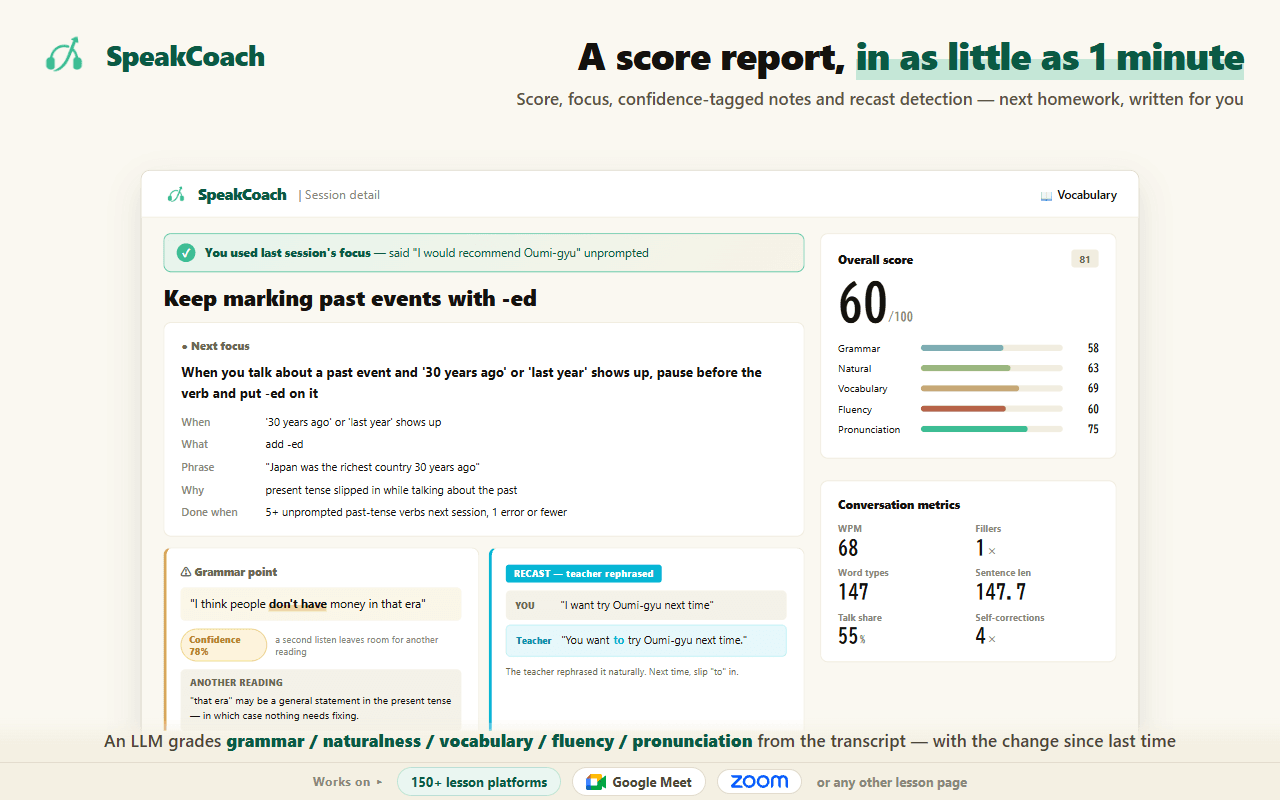
Not textbook English — the English that actually came out of your mouth that day. Slips, unnatural phrasing and the places where you started a sentence and gave up all get a better way to say it. The moments the teacher rephrased you are lined up next to it.
Noticing the gap between what you said and the natural version, and receiving that gap as feedback, are steps with evidence behind them in second-language research. During a class you are busy speaking, so the gap is collected and shown afterwards.
From the audio arriving to that screen being readable usually takes under two minutes. Across 405 measurements in the last 30 days, 91% were readable inside two minutes.
The number of corrections is a median of 20 per class, measured over 460 classes in the last 30 days, with 5 or more in 98% of them. They fall into grammar, vocabulary, naturalness and fluency.
3. Pronunciation is scored word by word
Instead of stopping at "your pronunciation needs work", it names the word and the sound. Where a sound is hard for speakers of your language, it says why.
A median of 8 words are flagged per class (measured over 454 classes in the last 30 days).
4. What you could not say comes back later
Phrases you could not produce, and wordings the teacher corrected, do not disappear. They stay as cards and are shown again once you have half forgotten them — so a mistake does not quietly settle in as the version you keep saying.
A class produces a median of 8 cards (measured over 452 classes in the last 30 days; up to 21 on a heavy day). You never write them out yourself.
5. That becomes the prep for your next class
When you open your next class, the prep tab already lists today's focus and today's target phrases. They are built from the previous class, so there is nothing for you to prepare. You just read them.
What people using it say
These are from people actually using it.
I understood for the first time that I keep making exactly the same mistake in exactly the same place.
Source: SpeakCoach user interview (retrieved 2026-09-09)
I used to think "I have taken a lesson every day for two and a half years and I still cannot speak." Seeing the transcript of what I actually said, and seeing what I can already do, made me think "I speak more than I thought, and my pronunciation is better than I thought." It gave me confidence.
Source: In-product survey (25 lessons analysed, 17 days in) (retrieved 2026-09-09)
An online English class that used to just end vaguely became something that counts. What I could not say, I can relearn right after the class.
Source: In-product survey (34 lessons analysed, two weeks in) (retrieved 2026-09-09)
How to start
Three steps. It takes a few minutes.
Step 1. Add it from the Chrome Web Store
Open the store page and press Add to Chrome. You need Chrome, or a browser built on the same engine.

Step 2. Create an account and sign in
You can sign in with a Google account, or create one with an email address and password. This part is free and takes no card.
Step 3. Start recording on the lesson page
Open the lesson page you always use and the panel appears by itself. Press start recording and take the class. Stopping is all you do; the rest runs on its own.
Services it works with
It runs on more than 150 online English sites, including NativeCamp, Preply, Cambly and italki, as well as Google Meet and Zoom. If you speak English online, it does not have to be a school.
Some services prohibit recording a lesson in their terms. On those, the extension does not capture the teacher and records only your own speech.
Pricing
You can start free. Paid plans differ in how many classes a month you can have analysed. If you use up a month's allowance, you either wait for the next month or move up a plan.
| Plan | Per month | Classes analysed |
|---|---|---|
| Free | $0 | 3 a month (5 in your first month) |
| Starter | $20 | 10 a month |
| Standard | $30 | 20 a month |
| Pro | $50 | Unlimited |
Source: SpeakCoach
Paying yearly costs less than paying monthly — Standard is $252 a year instead of $360.
How your audio is handled
Your class audio is used to correct your English and nothing else. There are three commitments.
- Data used for AI processing is not used to train AI models.
- Traffic is encrypted, and audio files are stored encrypted.
- You can delete your data yourself. If you close your account, recordings, transcripts and analysis are deleted within 30 days.
How long audio files are kept, and which companies process the transcription and analysis, are named in the Privacy Policy.
What it does not do, and who it does not suit
- You cannot record on a phone alone. It is a Chrome extension, so you need to take the class in a desktop browser. The finished report reads fine on a phone.
- It does not put subtitles on the lesson. Reading the teacher takes your listening out of the loop.
- Below about one class a week it works less well. It hands the previous class's task to the next one, so long gaps thin that out.
- Pronunciation scoring is for English only.
If you want to measure your own lessons — SpeakCoach
In summary
- A Chrome extension that connects the before and after of the online English class you already take.
- One press to record. When the class ends, the correction is usually readable in under two minutes.
- What you could not say stays as cards and comes back later, and that becomes your next prep.
- More than 150 sites plus Google Meet and Zoom. A desktop browser is required for the class itself.
- Free for 3 classes a month, no card needed.
Sources
Every source below was checked by opening the page itself. Pages change, so we note the date each one was retrieved.
Source: Schmidt (1990) The Role of Consciousness in Second Language Learning, Applied Linguistics 11(2) (retrieved 2026-08-19) / Lyster & Saito (2010) Oral Feedback in Classroom SLA: A Meta-Analysis, Studies in Second Language Acquisition 32(2) (retrieved 2026-08-19) / SpeakCoach measurement (from audio arriving to the first correction being readable, last 30 days) (retrieved 2026-09-09) / SpeakCoach measurement (corrections, flagged words and review cards per lesson, last 30 days) (retrieved 2026-09-09) / Selinker (1972) Interlanguage, IRAL 10(1-4) (retrieved 2026-08-19) / SpeakCoach user interview (retrieved 2026-09-09) / In-product survey (25 lessons analysed, 17 days in) (retrieved 2026-09-09) / In-product survey (34 lessons analysed, two weeks in) (retrieved 2026-09-09) / SpeakCoach measurement (sites the published extension runs on, rounded down) (retrieved 2026-09-09) / SpeakCoach pricing (from the implementation) (retrieved 2026-09-09)
Frequently asked questions
- Do I have to switch the online English service I use?
- No. It is a Chrome extension that sits on the lesson page, so you keep the school you already pay for. It works on more than 150 online English sites plus Google Meet and Zoom, and it keeps working if you change schools.
- Is it all right to record without telling the teacher?
- It depends on the service. Some prohibit recording a lesson in their terms; on those the extension does not capture the teacher and records only your own speech. Terms change, so check your service's terms before you start.
- My school already records and transcribes lessons. What does this add?
- Several services do keep a recording or a transcript, so you can read back what was said. What this adds comes after that: what to fix and how, and what to aim for in the next class. If a recording is all you want, check what your school already keeps first.
- What happens to the audio you record?
- It is used to correct your English and nothing else. Data used for AI processing is not used to train AI models. Traffic is encrypted and audio files are stored encrypted. If you close your account, recordings, transcripts and analysis are deleted within 30 days. Retention details and the companies that process transcription and analysis are named in the Privacy Policy.
- Can I use it on a phone only?
- You cannot record. It is a Chrome extension, so the class has to be in a desktop browser. The finished report and the word list read fine in a phone browser, which is useful on the move.
- How long after the class until I get the result?
- From the audio arriving to the correction being readable is usually under two minutes: across 405 measurements in the last 30 days, 91% were inside two minutes. The time for the audio to upload after you finish is on top of that, so the wait in front of you is a little longer.
- Do I have to design the review myself?
- No. Phrases you could not say and wordings the teacher corrected become cards automatically and are shown again once you have half forgotten them — a median of 8 cards per class. The prep for your next class is also built from the previous one.
- Can I try it free?
- Three classes a month are analysed free, five in your first month, and no card is needed. Paid plans are Starter at $20 a month for 10 classes, Standard at $30 for 20, and Pro at $50 for unlimited.